Where to find each policy
On this page
4Search publishes its policies as ordinary pages on every site. This guide says what each one is for, so you can go to the right one without reading them all.
#Where they are
Every policy is linked from the page footer, in the Legal and Policies columns. A few are also in the Menu: Privacy Policy, Your Privacy Choices, Terms of Use, Data Licensing and Accessibility.
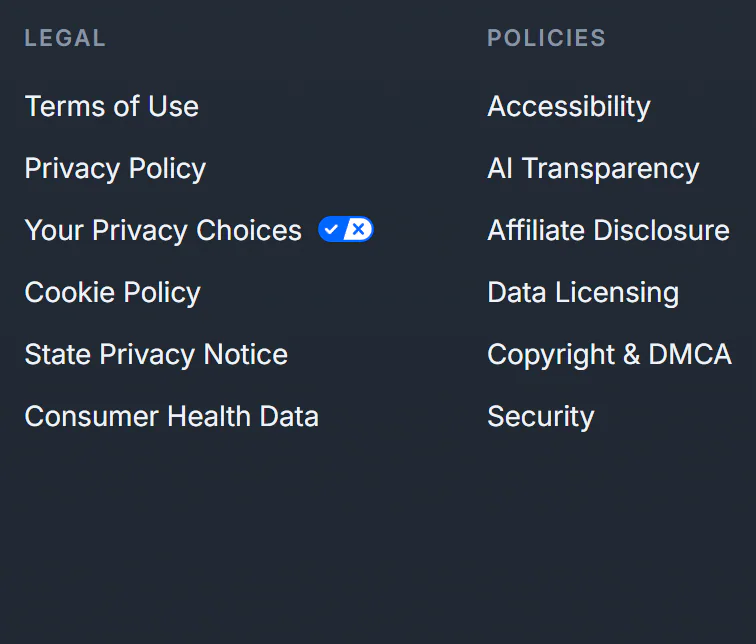
The footer's Legal and Policies columns link to every policy.
- 1Your Privacy Choices
- 2Cookie Policy
- 3AI Transparency
#What each one covers
| Policy | What it covers | Read it when |
|---|---|---|
| Privacy Policy | What is processed, why, how long records are kept, who receives information, and your rights | You want the full picture |
| Your Privacy Choices | The controls for optional services and how to make a rights request | You want to change a choice or ask for something |
| Cookie Policy | Each cookie and browser-storage item, how long it lasts, and Global Privacy Control | You want to know what your browser stores |
| U.S. State Privacy Notice | The notice at collection and the rights state laws give, with California and Nevada details | You live in a U.S. state with a privacy law |
| Consumer Health Data Privacy Policy | How health-related searches are treated and the rights around them | You are concerned about health-related searches |
| Children's Privacy Notice | Age limits and what parents can do | You are a parent or guardian |
| AI Transparency Notice | How AI Overview and AI Mode work, what is sent, limits and how to report a problem | You use AI answers |
| Terms of Use | The rules for using the sites, including automated access and what you can expect | You want the ground rules |
| Data Licensing | The restrictions on scraping and automated collection, and how to ask about a paid data license | You want to use 4Search data in a product, or you run a crawler |
| Copyright & DMCA | How to send a copyright notice or a counter-notification | You believe a link infringes your copyright |
| Affiliate Disclosure | Affiliate links, commissions and how shopping results are ordered | You shop through 4Search |
| Accessibility | The accessibility goal and how to report a barrier | You use assistive technology or need another format |
| Security | How to report a suspected vulnerability responsibly | You found a security problem |
#Good to know
- The wording depends on the site. Each site's policies describe the services that site runs, and the effective date changes when one of them changes. A site without Weather, for example, does not describe a home place.
- Reporting something. For accessibility, a security report or a data-licensing question, the policies point to the Contact page. See How to reach us for what to include.
- Rights requests have their own form. Use the Privacy Request Form, not the general contact form. See Make a privacy request.
#Common questions
Which policy tells me what cookies are used?
The Cookie Policy. It lists each cookie and storage item, its purpose and how long it lasts. See also What stays in your browser, and how to clear it.
Where do I report a security problem?
The Security page says to use the Contact page and begin your message with SECURITY REPORT, with the address of the page, a short description, the steps to reproduce it and its potential impact.
Where do I report an accessibility barrier?
Use the Accessibility page's link to the Contact page, which selects the accessibility topic for you. Say which page and feature, what the barrier is and what browser or assistive technology you use.